Skip to content

Inventory and transfers

Multi-location inventory management software with transfers checked at both ends.

See live stock balances for every site, with reorder points and alerts when stock reaches them. Move stock from the central store to each site with transfers dispatched at one end and received at the other.

What is multi-location inventory management software?

Multi-location inventory management software tracks stock separately at each store, site or warehouse an organisation runs, from one system. It shows live balances per location, warns when an item falls to its reorder point and records stock moving between locations, so a transfer reaches another site's balance only when it is confirmed there.

How it works

Inventory and transfers, step by step.

  1. 01

    Stock arrives through receiving

    Accepted goods from each delivery update that site's live balance the moment they are recorded.

  2. 02

    Reorder points per site

    Each site's items carry reorder points. When stock reaches one, Bollard raises an alert.

  3. 03

    Dispatch a transfer

    The central store creates a transfer to a site and records it as dispatched.

  4. 04

    Confirm on arrival

    The receiving site confirms the transfer when it arrives, and the stock joins that site's balance.

  5. 05

    See the network by role

    Site managers see their own site's stock. Head office and finance see every site, with row-level security deciding who sees what.

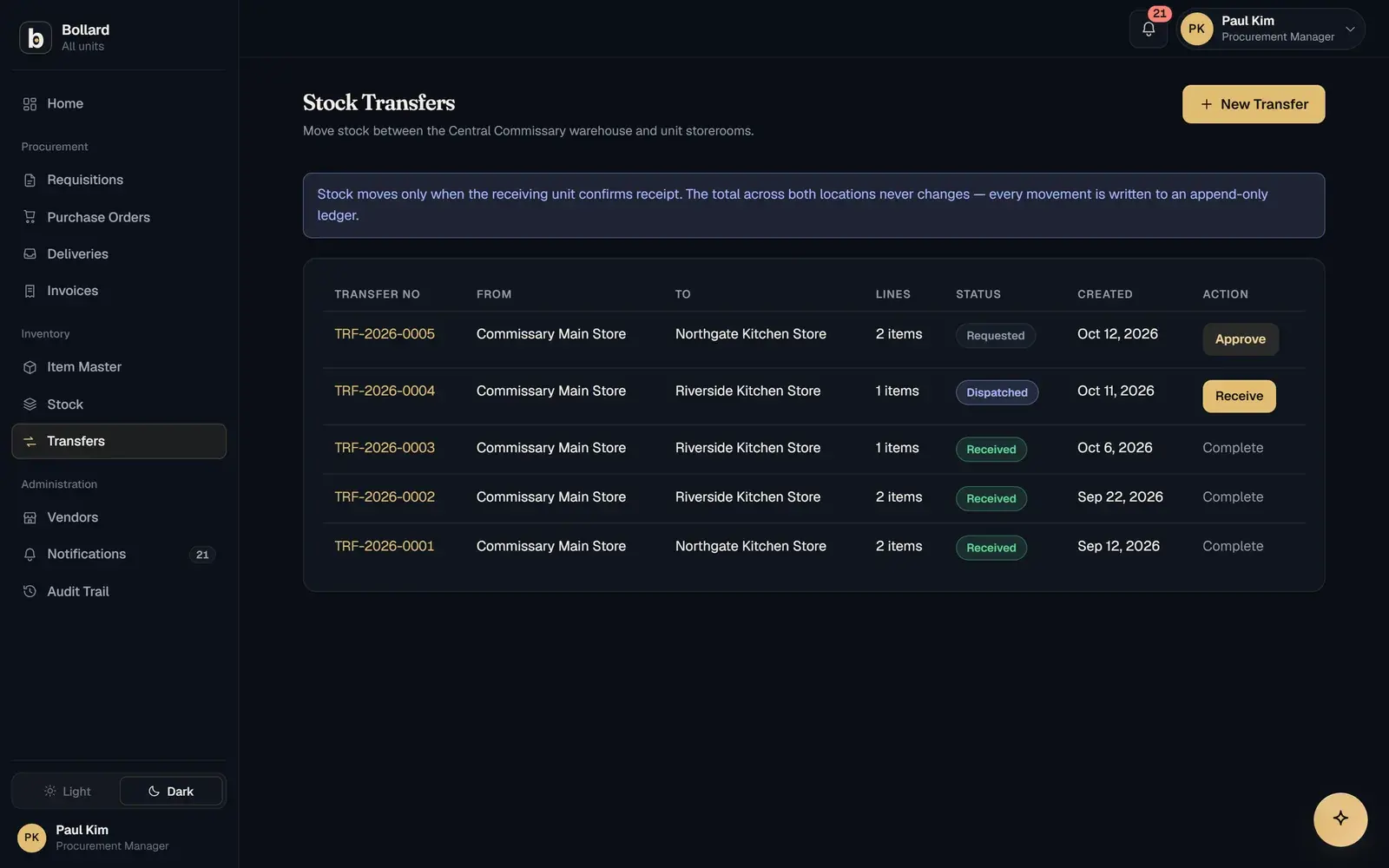
Stock transfers between the central store and individual sites, with dispatch and receipt status.

What does multi-location inventory management software do?

Multi-location inventory management software keeps a separate, live stock balance for every location and a record of everything moving between them. In Bollard, each site has its own balances and reorder points, and the central store sends stock to sites through transfers confirmed at both ends.

For an organisation with a central store and many sites, the hard part is the stock in between. Goods that have left the central store but not reached the site are easy to lose track of, and one site can run short while another holds plenty. Live balances per site make both visible.

How do stock transfers between locations work?

A transfer is dispatched by the sending store and received by the destination site, and each end records its half.

Two-step transfers matter because goods can go missing or arrive short on the way. If a transfer counted as arrived the moment it was sent, the site would show stock it never received. Confirming at the receiving end ties the site's balance to what was physically checked in.

In the configuration Safock offers for specialty retail, reorder points are set per branch and transfers between branches even out stock. It is aimed at a familiar problem in branch networks: branches running out while the distribution centre has stock.

How do reorder point alerts work?

A reorder point is the stock level at which an item should be replenished. When a site's balance reaches it, Bollard raises an alert, so the shortfall is dealt with before the shelf is empty.

Setting the point is a trade-off between holding stock and running out. It usually reflects how fast the item is used and how long new supply takes to arrive. Because balances update the moment goods are accepted, the alert works from current stock.

The multi-unit dining configuration uses par levels by unit, with shortfalls flagged. Staff can also ask the assistant in plain language what is below reorder level at a site, and it answers from live data within what their role may see.

Why are inventory records so often wrong?

Inventory records drift when updates depend on someone remembering to make them. Research across 37 stores of one retailer found 65% of inventory records were wrong (DeHoratius and Raman, Management Science, 2008).

Common causes include deliveries counted but never entered, damaged goods left in stock and transfers recorded at one end only. Bollard deals with each at the point it happens: accepted quantities update stock at receiving, rejected stock never enters it, and a transfer is confirmed by the site that receives it.

How does central store inventory connect to receiving and requisitions?

Inventory runs alongside the request-to-payment loop and is fed by it.

The step before is receiving. Stock rises when goods are accepted at the dock against a purchase order, and rejected goods never count.

The step after is the next request or transfer. A reorder alert is the prompt to raise a requisition or send stock from the central store. In the education configuration, the central store also pools faculty orders into bulk purchases, so one order to a supplier can cover several departments.

Is a spreadsheet enough for multi-site stock control?

A shared stock sheet works on day one, but it has no controls: anyone can overwrite a cell, and sharing the file shares every site's figures.

A typical ERP handles multi-site stock in the vendor's vocabulary, after months of implementation. Bollard uses your own terms for sites and stores, such as campus and central store, unit and central commissary, or jobsite and equipment yard, and the first site is live in about two weeks. Each site sees only its own records, enforced by row-level security in the database.

Questions

Common questions.

What is a stock transfer between locations?

A stock transfer moves inventory from one location to another within the same organisation, such as from a central store to a site. It reduces the sending location's stock and increases the receiving one. In Bollard the transfer is dispatched at one end and confirmed at the other, so a site's balance only grows once the goods have arrived.

How do you manage inventory across multiple locations?

Give every location its own live balance, set reorder points per site and record every movement between locations at both ends. Keep one system as the record, so head office sees the network and each site manager sees their own stock. Bollard follows this pattern, with access to each site's records enforced in the database.

What is a reorder point?

A reorder point is the stock level that triggers replenishment. It is usually set from the rate an item is used and the time new supply takes to arrive, plus a buffer for variation. In Bollard each site has its own reorder points, and an alert is raised when stock at that site reaches one.

Can site managers see stock at other sites?

Site managers see their own site's records, while head office and finance see the whole network. This is enforced with row-level security in the database, so an export or report cannot show a site manager more than their screen does. Local teams work on their own stock and central teams get the full picture.

What is a central store?

A central store is the main stock-holding location that supplies an organisation's sites. A restaurant group might call it a central commissary, a clinic network a central pharmacy, a retailer a distribution centre and a contractor an equipment yard. Bollard uses whichever name you use and runs transfers from it to each site.

Can I ask which items are running low at a site?

Yes. Bollard's assistant answers plain-language questions from live data, such as what is below reorder level at a particular site. It only shows what the person's role may see, so a site manager asking the question gets their own site's answer while head office can ask across the network.

See Bollard set up for your operation.

Tell us how you buy and store today. We'll walk you through Bollard configured with your sites, roles and approval rules.

Book a demo
support@safock.com