Skip to content

Approval workflows

Purchase approval workflow software that routes by amount, site and role.

Approval chains follow your rules. Approvers see the full request on one screen, on a phone or at a desk, and decide in one click. A rejection needs a remark, and every decision is written to the audit log.

What is purchase approval workflow software?

Purchase approval workflow software sends each purchase request to the people who must sign it off, in the right order, based on rules such as amount, site and role. It replaces approval by email with a recorded decision at every level, so finance knows who approved each purchase, when, and against which limit.

How it works

Approval workflows, step by step.

  1. 01

    Rules set in discovery

    Safock maps who approves what during discovery: the amount limits, the sites and the roles. These become the routing rules.

  2. 02

    Route chosen on submission

    When a requisition is submitted, Bollard picks the chain from the amount, the site and the requester's role. The requester saw that route before submitting.

  3. 03

    One screen per decision

    Each approver sees the full request on one screen: items, quantities, estimated total, budget code and reason. It works on a phone or at a desk.

  4. 04

    Approve, or reject with a remark

    The approver decides in one click. Rejecting needs a remark, so the reason is always on record.

  5. 05

    Up the chain, then to ordering

    An approved request moves to the next level until the chain is complete, then on to sourcing and the purchase order. Each decision is written to the audit log.

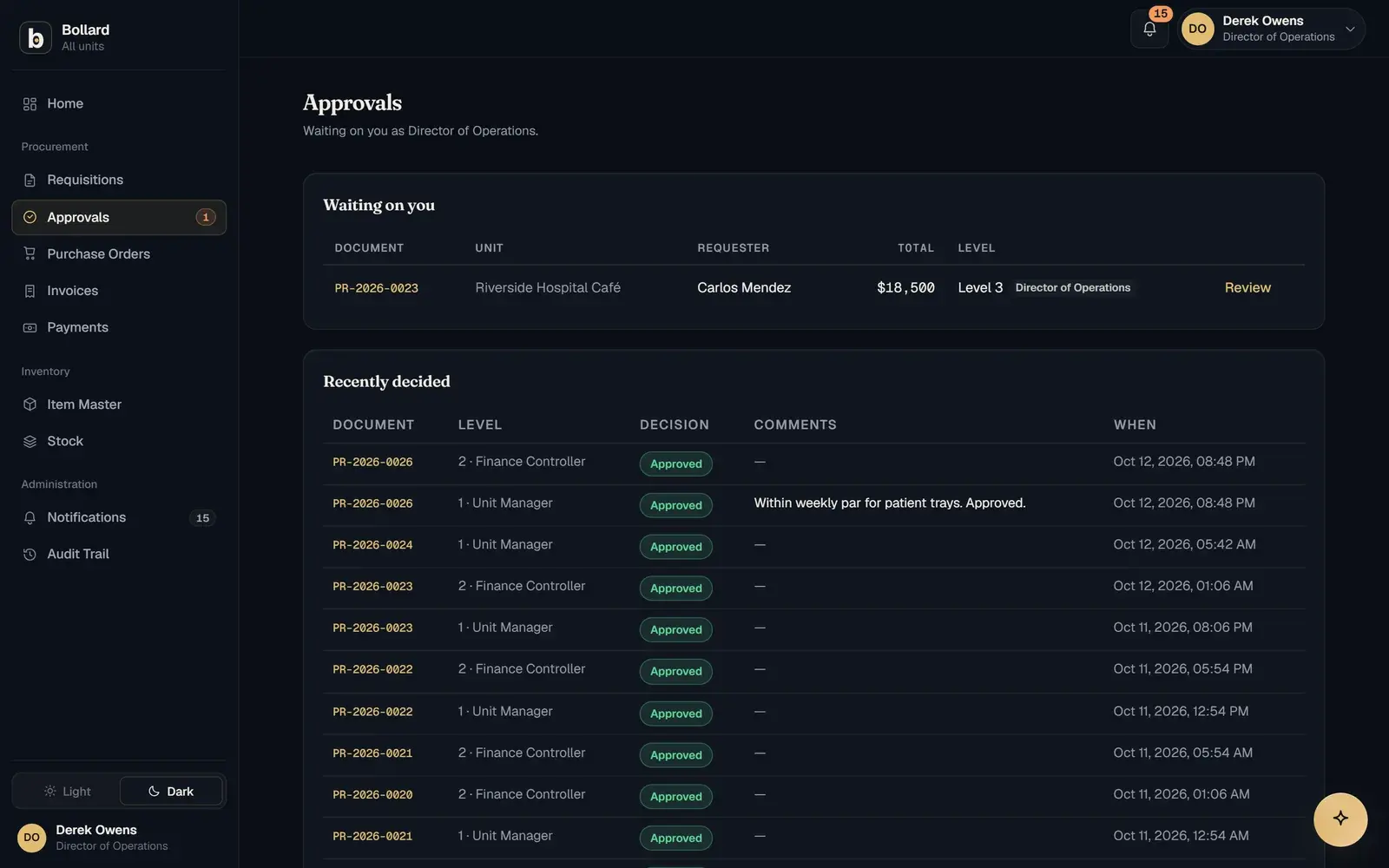
The approvals queue showing pending purchase requests by site and approval stage.

How does purchase approval workflow software work?

Purchase approval workflow software applies a set of rules to every request and turns the result into a chain of named approvers. In Bollard the rules use three inputs: the amount, the site and the requester's role. A small consumables order at one site might need one sign-off, while a large equipment purchase might need three.

Multi-level routing is keyed to amount limits. Each level has a limit, and a request climbs as far as its value requires. Because the chain is worked out from rules, nobody has to remember who covers which site or which threshold, and nobody can pick a friendlier approver.

What is a procurement approval matrix?

A procurement approval matrix is the table that says who may approve which purchases, usually by amount band, cost centre, site or category. The workflow is how that policy gets applied to each request as it arrives.

Most organisations already have a matrix, often in a finance policy that few requesters have read. Setting up approvals in Bollard means turning that document into routing rules. Safock does this in the discovery days at the start of setup, using your role names and your thresholds, and you see it working on a pilot site before it goes wider.

What do multi-level approval chains look like by sector?

Approval chains follow the hierarchy an organisation already has. These are the chains in the configurations Safock has built or offers:

  • University or college: head of department, then faculty finance, then the procurement office
  • Multi-unit dining: unit manager, then district manager
  • Regional healthcare: clinical supervisor, then medical director, with two sign-offs for controlled supplies
  • Specialty retail: area manager, then regional director, with spot buys capped by a tight spend limit
  • Civil construction: project manager, then commercial director

Why should rejecting a purchase request need a reason?

A rejection without a reason leaves the requester guessing. Bollard requires a remark to reject, and the remark is written to the audit log with the decision.

The remark tells the requester what was wrong with the request. Later, it lets an auditor see why a purchase was refused as clearly as why another was approved, which matters when someone asks whether the policy is applied the same way at every site.

How do approvals connect requisitions to purchase orders?

Approvals come straight after the request, the second of seven steps from request to payment.

The step before is the requisition. The requester has already added a budget code and a reason and seen the estimated total and the route, so the approver is judging a complete request with nothing to chase.

The step after is sourcing and the purchase order. An approved request goes to purchasing, which sends RFQs, compares quotations and raises the PO from the winner. The approved items and quantities carry forward, and the PO then fixes the price that the delivery and invoice are checked against.

How is this different from approving by email or in an ERP?

Email approval depends on memory, and ERP approval routing usually arrives after a long configuration project. Bollard sets up routing in discovery and records every decision in an append-only log.

With spreadsheets and email, an approval is a reply in someone's inbox. It is hard to find later and easy to skip when the right person is away. An ERP can route by amount and role, but in the vendor's vocabulary and after months of implementation. Bollard puts the first site live in about two weeks, in your own terms, and improvements reach every site the same day.

Questions

Common questions.

What is multi-level approval?

Multi-level approval means a request needs sign-off from more than one person, usually in sequence, with higher levels added as the amount rises. In Bollard each level is tied to an amount limit, so a low-value request might stop at the first approver while a large one continues up the chain to finance or a director.

Can approvers approve purchase requests on their phone?

Yes. Approvers see the full request on one screen on a phone or at a desk: the items, quantities, estimated total, budget code and reason. They approve or reject in one click, and a rejection needs a remark. The decision is recorded in the audit log the moment it is made.

Can approval rules differ by site?

Yes. Routing uses the site as well as the amount and the requester's role, so two sites can have different approvers. Site managers see their own site's requests, enforced with row-level security in the database, while head office and finance see the whole network.

Who sets up the approval rules?

Safock does, with you, during discovery in the first days of setup. You bring your approval policy, thresholds and role names, and Safock turns them into routing rules in Bollard using your own vocabulary. You see the rules working on a pilot site before the rest of the network goes live.

Is every approval decision recorded?

Yes. Every approval and rejection is written to the audit log with the user, the time and the remark where one was given. The log is append-only, so a decision cannot be edited or removed afterwards. Corrections are added as new entries, which keeps the original decision visible to auditors.

What happens after a purchase request is approved?

It moves on to sourcing and ordering. Purchasing can send RFQs to suppliers, compare quotations side by side and raise the purchase order from the winning quote. The PO carries the agreed price, terms and delivery site, and those terms are what the delivery and the invoice are later checked against.

See Bollard set up for your operation.

Tell us how you buy and store today. We'll walk you through Bollard configured with your sites, roles and approval rules.

Book a demo
support@safock.com